
A holiday closure needs more than a changed greeting. Someone must decide where calls go while reception is away, check that the destination works, and restore ordinary routing before the team reopens. This walkthrough creates a temporary rule for one business number while keeping its everyday rules ready underneath it.
The Call Routing → Time Schedules screen defines repeating weekly windows. Its dispatch-rule editor does not offer a one-off holiday date or automatic expiry. This guide therefore uses a deliberately enabled and disabled holiday override. Writing dates in a rule's name or description documents your plan; it does not schedule activation.
Plan the closure and destination
Our example is Bahari Repairs. Reception normally answers the main line, but the office will close at 17:00 on 30 September and reopen at 08:00 on 2 October, using Africa/Dar_es_Salaam time. During that company closure, calls should forward to the duty manager's staffed phone. These are example closure dates, not a public-holiday calendar.
Prepare the following before opening the editor:
- The actual business number customers dial, and the duty manager's verified phone number in international format.
- Access to view and edit Call Routing. If the controls are missing, an owner can review your access in Team settings.
- A person responsible for activating the rule and another person who can restore normal service if that person is unavailable.
- A separate phone for testing incoming calls, plus a second business number to check that unrelated routing stays unaffected, if your workspace has one.
Call the duty manager directly first. Confirm they can answer throughout the closure and know what to tell customers. Forwarding to an unattended phone simply moves the missed call elsewhere. Agree how they will record requests and hand them to reception after reopening.
If customers should hear an announcement instead, prepare and publish the IVR before selecting it as a routing destination. The IVR greeting guide helps write a short closure message with the reopening date and a realistic next step.
Record the normal route before changing anything
- Open Call Routing. Find the rules that currently handle the main line. Note their names, priorities, enabled states, conditions and actions. Open Edit to inspect details when the list summary is insufficient.
- Use Evaluate Sample Call. Enter the business line as Called Number, your test phone as Caller Number, and select Evaluate. Record the matched rule and action as your baseline.
- Check whether a caller-specific rule must remain ahead of holiday cover. For example, a blocking rule should retain its intended precedence. Rules are evaluated from lower priority numbers to higher ones, so choose an unused position ahead of ordinary reception routing without accidentally overriding a deliberate restriction.
For this example, an existing restricted-caller rule could have priority 0, holiday cover 10, reception 100, and a general fallback 900. These numbers illustrate ordering. Use values appropriate to your existing rules and avoid equal priorities where the intended winner would be unclear.
Create a disabled holiday rule
- Select New Rule. In Rule Name, enter Reception holiday cover. Set Priority to your chosen value, then clear Enabled while you prepare the rule.
- In Description, write the operational instruction: “Forward main-line calls during company closure. Activate 30 September, 17:00; deactivate 2 October, 08:00; Africa/Dar_es_Salaam. Owner: reception supervisor.” Replace those details with your actual dates and owner.
- Under Conditions, select Add Condition, choose Called Number, and choose the exact main line from the tenant-number list. Confirm it is the number customers call, rather than the manager's destination number.
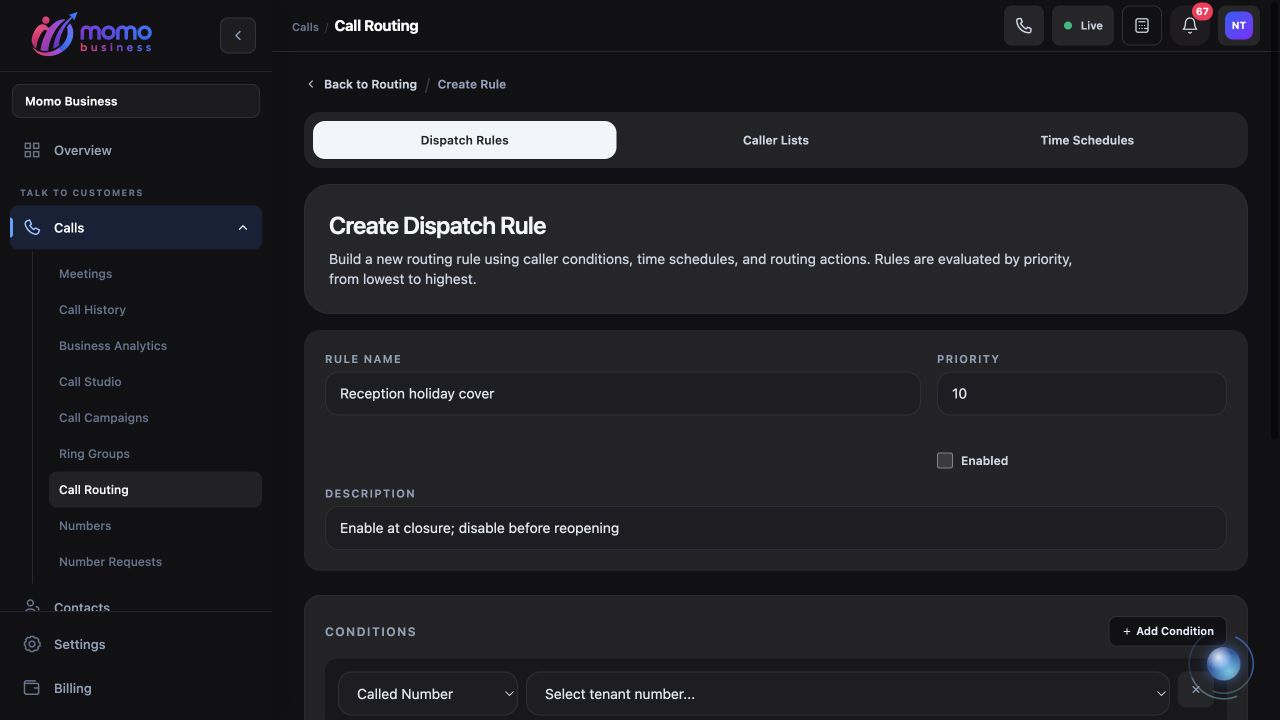
Use an exact called-number condition and keep the holiday rule disabled until the planned handover.
A rule without conditions acts as a catch-all. For this one-line example, do not leave the conditions blank or choose All Numbers. If several branches share the same holiday arrangement, Phone Number Set lets you choose a specific collection of assigned numbers, but test every selected branch before using that broader setup.
- Under Primary Action, set Action Type to Forward. Enter the staffed duty number in Forward To, using its full international form. Double-check every digit with the manager.
- Review Fallback Action. Leave Fallback Type as None for the basic forwarding example. If you already have a tested holiday announcement flow, you can choose IVR Flow and select it as a fallback. The form does not expose a forwarding ring timeout, so do not assume a particular no-answer interval; verify the actual outcome on the line.
- Select Create Rule. Back on Call Routing, confirm that Reception holiday cover appears with the correct condition, action, priority and disabled state.
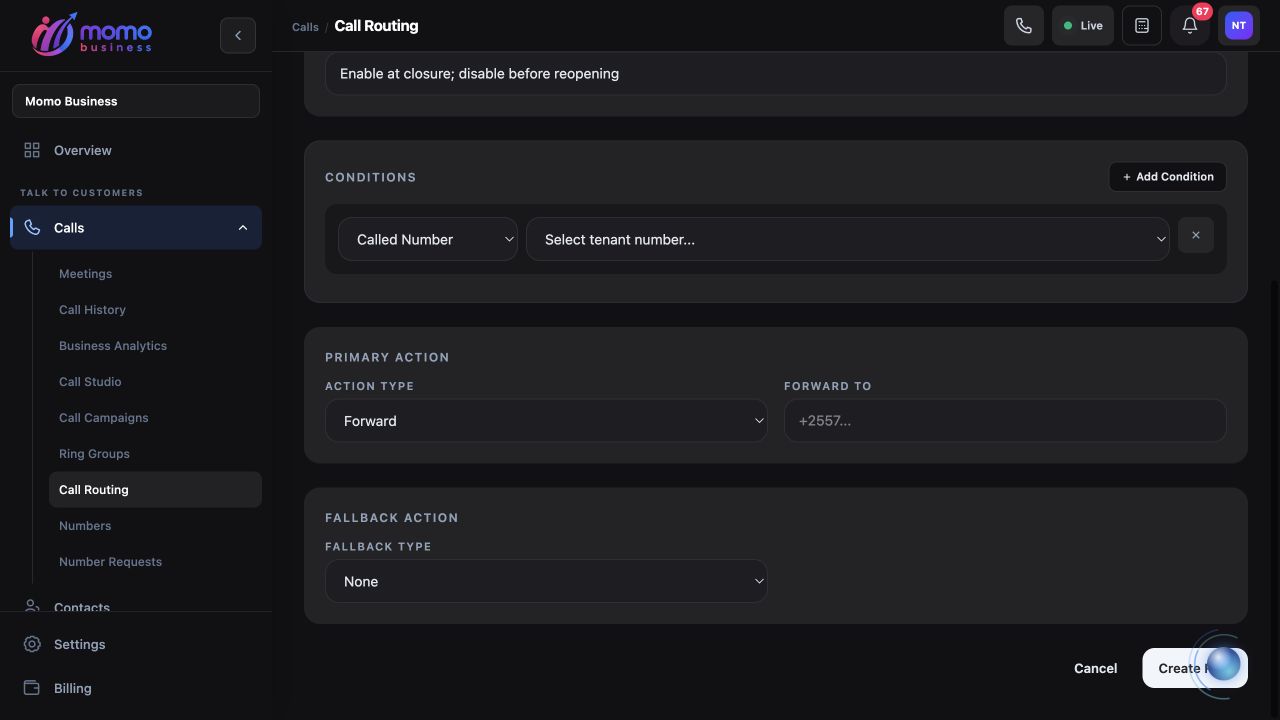
Forward To is the receiving phone. A configured fallback needs its own live-call test.
Activate and test the holiday handover
- At the agreed handover time, open the holiday rule with Edit, select Enabled, and choose Save Rule. Confirm the enabled state in the routing list.
- Repeat Evaluate Sample Call with the same main line and test caller. The result should now identify the holiday rule, unless an intentionally earlier rule applies to that caller.
- Call the main line from the separate test phone. Have the duty manager answer, identify the business, and speak in both directions. Record when the test happened and who answered.
- Repeat while the manager deliberately does not answer. Listen to the complete outcome. If you configured an IVR fallback, verify that the announcement plays and the call reaches its intended ending. If the outcome is unacceptable, restore the previous route while you correct the destination or fallback.
- Test an unrelated business number, if available. Its expected route should remain unchanged. Also test a caller covered by an intentional exception when you can do so safely.
The sample evaluator accepts called and caller numbers; it does not provide a future date picker. It checks the current routing decision. It also does not dial the destination, prove audio works, or prove someone will answer. Keep those checks as separate steps.
Restore normal service before reopening
- Before customers expect reception to be open, edit Reception holiday cover, clear Enabled, and select Save Rule. Keep the disabled rule if it will be useful for another planned closure.
- Evaluate the same sample again. Compare the result with your saved baseline, allowing for the normal time schedule at the moment of the test.
- Place another real inbound call and have reception answer. Confirm that the duty manager is no longer receiving ordinary calls, then hand over any requests collected during the closure.
Do not remove a weekday from the ordinary weekly schedule just to represent one holiday. That change repeats every week until restored. Keeping the temporary override separate makes the closure and reopening actions easier to inspect.
If a holiday call takes the wrong path
If reception still rings, check that the holiday rule is enabled, its Called Number is correct, and an earlier matching rule is not taking precedence. If every number forwards, inspect the conditions for a catch-all or an overly broad prefix. If evaluation selects the holiday rule but the manager does not ring, check the forwarding number and test the receiving phone directly.
If normal service does not return, inspect both the holiday rule and any other override enabled during testing. Confirm the ordinary schedule's timezone and current weekly window. If a saved routing change is not reflected by evaluation or live calls, retain the rule name, number, test time and observed result for support.
For a permanent reception arrangement beneath this temporary rule, continue with a ring group and no-answer fallback. For requests left during the closure, use the missed-call follow-up routine to give the reopened team a clear callback list.